Aurora
Dark sidebar, photo and timeline. The most visual.
Photo
Truly free · no sign-up · no watermark
Upload the PDF LinkedIn exports and we turn it into a clean resume with the template and colour you choose. Download it without paying, without an account and without us keeping your data.
Drag your LinkedIn PDF here
or click to choose it · max. 5 MBAny other CV in PDF (Word, Canva…) works too: we read what we can.
This easy
No tutorials. Drop the PDF, check what we read, choose how it should look and download.
Drag your LinkedIn PDF here
or click to choose it
Reading your PDF…Done in 1.2 s
Templates
Every template has been tested with real LinkedIn profiles: long names, ten jobs, three languages and endless paragraphs. The shield marks the ones applicant tracking systems (ATS) read well.
Dark sidebar, photo and timeline. The most visual.
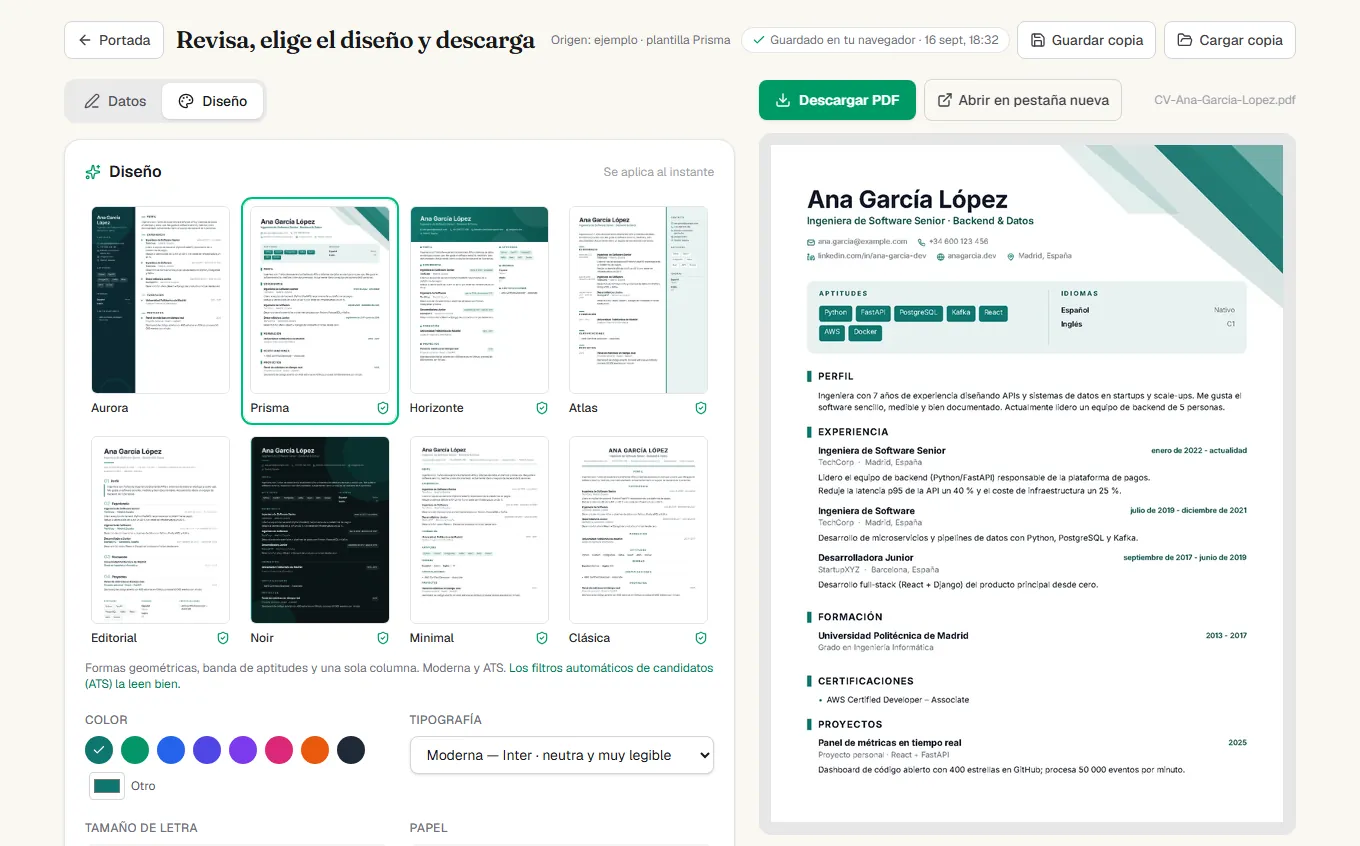
Geometric shapes, a skills band and a single column. Modern and ATS-friendly.
Gradient header and two columns. Modern and ATS-readable.
Light sidebar on the right and dates in the margin, like an index.
Big serif name, numbered sections, magazine feel.
Dark page tinted with your colour and glowing details. For digital delivery.
Every section in a card on a light background, with monogram or photo. A modern dashboard feel.
Initials in a colour square and section titles in a label column. Sober and very tidy.
Vertical timeline with a dot per role and small-caps dates. Single column, very visual.
Full-bleed colour header with a huge name and labelled sections. The one that stands out in a pile.
Dates in a narrow column, content on the right, thin rules: the German Lebenslauf.
Colour band on the right with photo, skills in capsules and languages; dates in pills.
Narrow margins, one-line headers and skills as running text. Two pages in one.
One column, sober and without photo. The safest for ATS.
Centered header, double rule and titles between lines. The classic CV, done well.
All templates are free and you can switch at any time without losing what you wrote. No “premium” tier.
How it works
Can't find the LinkedIn button? Step-by-step guide to export the PDF (Spanish), from desktop or mobile.
On your profile (desktop), click “More” → “Save to PDF”. Five seconds. No LinkedIn? Start from scratch.
We read the PDF and fill in the form: experience, education, skills, languages, contact details. Fix anything you like and add what LinkedIn doesn't have.
Template, colour, font and photo. The PDF is generated in your browser instantly and downloads without watermarks; Word too.
Why “no tricks”
There is no funnel here: we don't need your email, we don't sell “premium” templates and we don't keep your resume to make you come back. The PDF is generated in your browser and it is yours from the first second.
All of this is written down, point by point, on the privacy page (Spanish).
| CVSinTrampas | Other “free” builders | |
|---|---|---|
| Download the PDF | Free, always | They ask for your card at the end |
| Sign-up | Not needed | Account and email required |
| Watermark | Never | On the “free version” |
| Your data | Not stored | Kept in their database |
| Subscription | None | A trial that renews itself |
| Edits and downloads | Unlimited | Limited until you pay |
FAQ
Yes. There is no paid tier, no download limit, no watermark, no “unlock template”. We keep costs near zero because the site is static and the PDF is generated in your own browser.
No. No accounts, passwords or newsletters. You come in, upload the PDF (or fill in the form) and download.
It is sent to the server only to extract the text (name, experience, education, skills), processed in memory and discarded when done. Neither the file nor the extracted data is stored. The final resume is drawn in your browser and never leaves it.
On desktop: open your profile, click the “More” button under your photo and choose “Save to PDF”. In the mobile app this option doesn't always appear; if you can't see it, use a desktop browser.
Yes. We detect the language of the PDF and the section titles of the resume come out in that language. You can edit any text afterwards.
Of course. Click “Start from scratch” and fill in the form by hand; design and download work the same way.
Templates marked with the shield (Prisma, Horizonte, Atlas, Editorial, Noir, Mosaico, Monograma, Cronos, Bloque, Tabular, Densa, Minimal, Clásica) use real text, no images or tables, in a natural order, which is what those systems expect. Aurora / Lateral has a sidebar and can confuse some filters: use it when a person will read the CV.
Yes. Next to the PDF button there is “Word (.docx)”: a single-column, ATS-friendly version with your colour and font. Many job boards and agencies ask for that format.
We keep a draft in your browser's local storage (never on our servers). When you come back you'll see a notice to continue or discard it. You can also save a .json backup on your computer and load it in any browser.
Yes, in the templates that support it. The photo is cropped to a square and downsized in your browser; it isn't uploaded anywhere either.
Upload your LinkedIn PDF or start with the blank form. When you're done, download and that's it: no account, no payment, no watermark.